Platform data sources are the market-data backends IVPrior uses for scanner jobs — the same family as the Python CLI (yfinance, tradier, tastytrade). Platform staff register credentials here; Subscribers never see secrets. Plans (S-106) choose which sources a paying account may use.
Overview
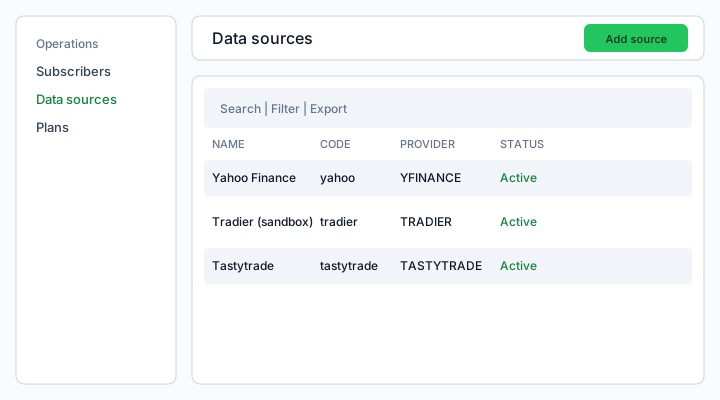
Figure: Operations → Data sources — search, filters, row actions, and Add data source (modal wizard).
What each column means
Name
Human label shown in Plan wizard selectors (for example Yahoo Finance). Editable anytime.
Code
Stable lowercase key (yahoo, tradier, tastytrade) used in jobs and entitlements. Auto-generated on create from Display name (for example Yahoo Finance → yahoo_finance). Not shown in the wizard and not editable afterward.
Provider
Implementation family:
- YFINANCE — free Yahoo proxy (CLI default when no API keys). Good spot/history; option IV less reliable.
- TRADIER — Tradier developer sandbox; needs API token in credentials.
- TASTYTRADE — Tastytrade REST; needs login credentials. Supplies real IV rank when available.
Status
- Active — can be linked to Plans and picked by scanner jobs.
- Inactive — hidden from new Plan links; existing subscriptions keep historical links until you update the Plan.
Permissions (platform.data_sources.*)
- read — list and view masked credentials hint
- create — Add data source (modal wizard)
- update — Edit, Deactivate
- delete — row Delete and bulk Delete selected
Without read, the nav item is hidden.
Add or edit a source
- Open Operations → Data sources.
- Click Add data source (or row ⋮ → Edit).
- Identity — display name (code auto-generated on create), provider, Active toggle. YFINANCE finishes here — no credentials step (public proxy, same as CLI without keys).
- Credentials (Tradier, Tastytrade, FMP only) — use the ? help icon next to the field for step-by-step instructions and vendor links. Secrets are encrypted at rest.
- Finish (create) or Save (edit). The list refreshes; the modal closes.
Credentials by provider
Use the ? icon in the wizard (Provider type on Identity, Credentials on step 2) for the same content inline. Below is the full reference for Support and AI chat.
Yahoo Finance (YFINANCE)
- Needs credentials? No.
- Wizard: Identity only — no Credentials step.
- What it provides: Free spot/history via Yahoo proxy (
yfinance). Option IV is less reliable than Tradier/Tastytrade. - CLI alignment: Default when
TRADIER_TOKENandTASTY_USER/ saved Tastytrade token are unset (get_source()→ yfinance). - Where to sign up: Not applicable — no API key.
Tradier sandbox (TRADIER)
- Needs credentials? Yes — sandbox Access Token (free developer account).
- Where to get them:
- Create a free account at developer.tradier.com.
- Open Developer → Dashboard.
- Copy the sandbox Access Token.
- Paste the token in the wizard Credentials field (plain text).
- Format: Single-line access token (not your login password).
- CLI alignment:
export TRADIER_TOKEN="your_token"— same value. - Notes: Sandbox is free; production Tradier keys are a separate product and not required for IVPrior scanner parity with the CLI.
Tastytrade (TASTYTRADE)
- Needs credentials? Yes — login for your Tastytrade account (or a saved session token).
- Where to get them: Active account at tastytrade.com. API details: developer.tastytrade.com.
- Format (wizard field):
- Two lines: email on line 1, password on line 2; or
- JSON:
{"login":"you@example.com","password":"your_password"}
- 2FA: If your account uses Google Authenticator, complete a CLI login once with
TASTY_OTP, then paste a saved session token, or rotate credentials during a maintenance window. - CLI alignment:
export TASTY_USER="email"andexport TASTY_PASS="password"(optionalTASTY_OTPfor 2FA). Local CLI caches session in.tasty_session.json(~24h). - What it adds: Real IV rank via Tastytrade market-metrics (Yahoo does not provide this reliably).
Financial Modeling Prep (FMP)
- Needs credentials? Yes — API key from FMP.
- Where to get them: Sign up at Financial Modeling Prep Developer and copy your API key from the dashboard.
- Format: Single-line API key.
- CLI alignment:
export FMP_API_KEY="your_key"for--screenermode only. FMP is not part ofget_source()auto-resolution (yahoo/tradier/tastytrade). - Use in IVPrior: Fundamental screener jobs when linked to a Plan — not the default options scanner chain.
Rotating secrets (edit mode)
On Edit → Credentials, leave the field blank to keep the stored secret. Enter new text only when rotating. Masked hint (••••abcd) confirms something is stored.
Deactivate vs delete
- Deactivate — soft off (
active=false). Use when a provider is misconfigured but you want to keep the row for audit. - Delete — permanent removal (
DELETEAPI). Use when the source was a mistake. Plans that still reference it need a new default in S-106.
Bulk Delete selected runs one delete per row; partial API failure aborts the rest.
CLI alignment
Local apps/cli get_source() resolves:
- tastytrade when
TASTY_USERor a valid saved token exists - else tradier when
TRADIER_TOKENis set - else yfinance (Yahoo)
Database seed upserts the same three codes so SaaS Plans match CLI vocabulary.
Common questions (Support)
Where do I get Tradier / Tastytrade / FMP credentials?
See Credentials by provider above. Each section lists the vendor URL, field format, and CLI env var name.
Why is there no Credentials step for Yahoo?
YFINANCE uses the public Yahoo proxy with no API key — same as the CLI default when no Tradier or Tastytrade env vars are set.
I pasted credentials but scans still fail
Check: (1) source is Active, (2) Plan links this source in Scanner entitlements (S-106), (3) token not expired (Tradier sandbox / Tastytrade session), (4) correct format (Tradier = token only, not password).
Can Subscribers see these API keys?
No. Only Platform staff with platform.data_sources.* permissions manage credentials. Subscribers see allowed source display names only.
How does this relate to the Python CLI?
apps/cli/data_source.py get_source() auto-picks tastytrade → tradier → yfinance from env vars. SaaS stores the equivalent secret per Data source row; seed upserts yahoo, tradier, tastytrade codes to match.
Test of the reader
If a Subscriber scan fails with “data source not allowed”, check Plan → Scanner entitlements (S-106) for linked sources and whether the source is still Active — not the Subscriber login email.