Scanner (/app/scanner) is the history of every scan you ran in this workspace. Each row is a ScanJob (Opportunities, directional, screener, backtest, Bollinger, or Analyze). Open a completed job to work the ranking on Scan results. IVPrior does not place trades.
Screen overview
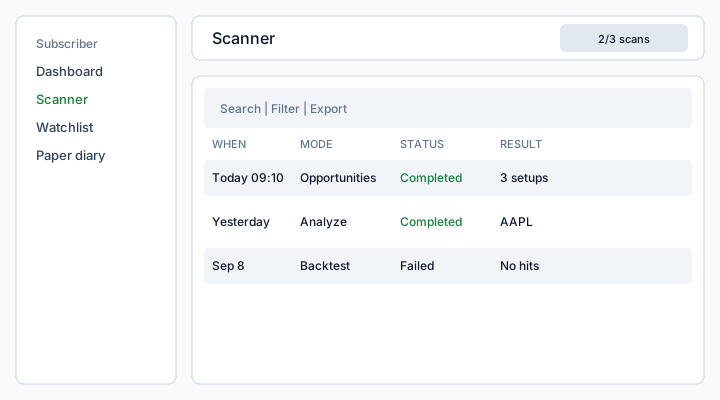
Figure: Scanner list — search, Filter, Export, checkboxes, and Run scan in the page toolbar.
What each column means
Date (When)
When the job was created (or completed, if the engine already finished). Default sort is newest first. Today and Yesterday use local time; older rows show a short date.
Mode
What the engine ran:
- Opportunities — ranked option setups: technical direction + IV (Implied Volatility / volatilidad implícita) regime vs HV (Historical Volatility / volatilidad histórica) + score. One ficha per ticker that passed. This is the daily ranking.
- Directional — technical direction only (moving averages / RSI). One row per ticker. No IV ranking and no strategy suggestion.
- Screener — fundamental “good and cheap” hits. Not an options signal. Mega-caps and ETFs often miss.
- Backtest — historical evaluation of signals. Each result row is one simulated trade, not one ticker. AMD twice means the strategy entered AMD twice. Green / red is that trade’s P&L. Tickers are simulated separately (not one combined portfolio). Long-only on the stock to validate the signal — it is not options P&L and not a broker order.
- Bollinger — where price sits in a 20-day, 2σ Bollinger channel. Each row is one ticker ranked by %B (0 = lower band, 1 = upper). A squeeze (tight channel) warns that a large move may follow — it does not say the direction. Signal uses a trend filter (buy pullbacks only if price is above SMA50). Not options P&L and not a broker order.
- Analyze — single-ticker ficha (also listed under Analyze)
Status
- Queued — accepted, waiting for the engine
- Running — in progress (progress % on the row)
- Completed — results are ready (⋮ View details)
- Failed — engine or data error; the row keeps the message
Result
A short preview: setup count and symbols for Opportunities, trades/win rate for backtest, or “No hits” when the run found nothing. Empty preview is not a failed job.
Universe
Which tickers and data source the job used (watchlist size, source code). Scans without a Plan universe use your Watchlist.
How to use
- Open Scanner in the sidebar.
- Click Run scan — choose mode, data source, universe, and which watchlist tickers to include (all selected by default).
- Wait until status is Completed, then ⋮ View details (or the result chip) to open results.
- Filter by mode, status, and date; Export copies or downloads the visible list.
- Delete one job or a bulk selection — paper diary rows are not removed.
Permissions and limits
The badge {remaining} of {max} scans left today is your Plan’s maxAsyncRunsPerDay. Hitting the cap returns a quota error until the next UTC day. Modes your Plan disables (for example Bollinger) stay hidden in Run scan.
See also: Scan results · Watchlist · Paper diary.