Analyze (/app/scanner/analyze) runs one ticker — the SaaS equivalent of TICKER --opciones: direction, IV (Implied Volatility / volatilidad implícita) regime, strategy, discard reason, contracts, broker checklist. It is not Run scan (no universe). Each Analyze creates a ScanJob with mode ANALYZE.
Screen overview
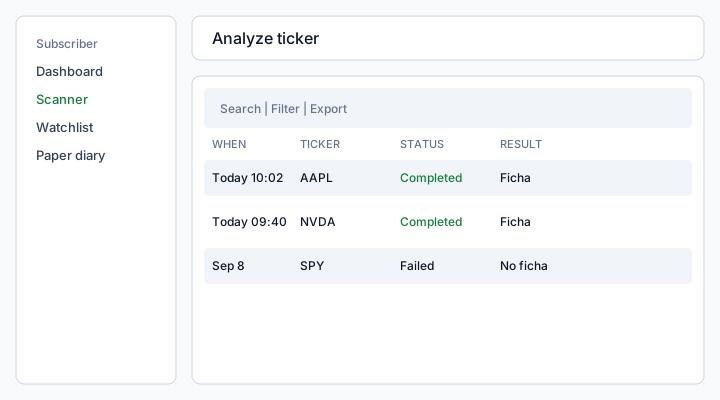
Figure: Analyze list — same CRUD chrome as Scanner history; Analyze opens a form modal, View details opens the ficha sheet.
What each column means
When
When this Analyze job was created. Same Today / Yesterday formatting as Scanner history.
Ticker
Symbol you submitted. It must be on your watchlist and runnable (watchlist active, catalog still active).
Status
Queued, Running, Completed, or Failed — same job machine as other scan modes. A failed Analyze keeps the error on the row.
Result
Completed jobs show a short “ficha” preview (one symbol). Empty preview means the engine returned no options context.
How to use
- Open Scanner → Analyze.
- Click Analyze (toolbar or empty state).
- Pick a ticker from your watchlist and a data source, then submit.
- On success the modal closes and a full-width sheet opens with the options ficha. Plans with context chart also show session candles (OHLC + volume) for the price the engine used — as of that run, not live.
- From Paper diary or scan results, View / Analyze can land on
/app/scanner/analyze?ticker=AAPLand prefill the form if that symbol is still on the watchlist.
Default chart range is 1A (daily). 1M uses hourly bars when the source returned them; otherwise you see “Intraday bars unavailable — daily only”. Bollinger bands overlay daily bars (off on 1M). This is not TradingView, not a live chart, and not a broker order — there is no Operar / Buy.
Without the Plan flag you still get the ficha plus an upgrade CTA. Older Analyze jobs have no snapshot: empty chart, ficha unchanged.
Save to paper diary from the ficha when you want a research note without a trade. After save, In diary (green) opens that snapshot on Paper diary.
Permissions
Analyze consumes the same daily scan quota as other jobs when it is persisted as a ScanJob. Tickers not on the watchlist are rejected. Inactive watchlist rows do not appear in the combobox. Context candles require the Plan toggle Analyze context chart.
See also: Watchlist · Scan results · Paper diary.