The Paper diary (/app/scanner/diary) stores ideas you saved from scan results or Analyze. It is the SaaS counterpart of CLI diario_*.csv. There is no Add button — entries only come from Save to diary. IVPrior does not store fills or P&L.
Screen overview
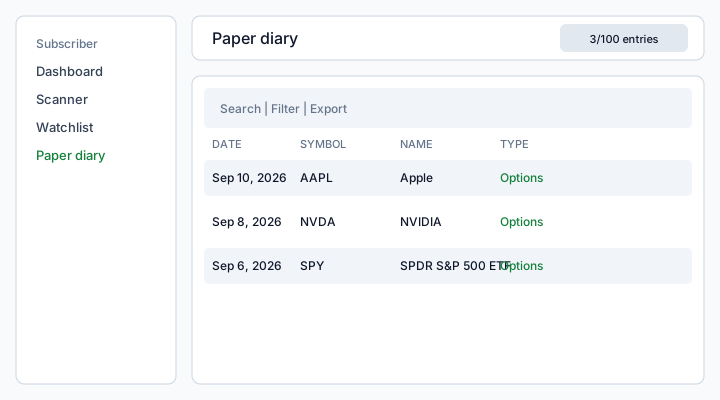
Figure: Paper diary — search, Filter (type + date), Export, checkboxes, and ⋮ View (snapshot) / Analyze now / Delete.
What each column means
Date
When you saved the idea. This list keeps a date column (unlike Watchlist). Format is a short locale date such as Sep 10, 2026. Default sort is newest first.
Symbol
Ticker stored on the entry (AAPL). Missing symbol shows an em dash.
Name
Display name from the platform catalog for that symbol (same source as Watchlist). Unknown symbols show an em dash.
Type
- Options — saved from an options opportunity / Analyze ficha
- Equities — equity-style diary row (rare; same table)
Summary
Compact snapshot of the ficha at save time: signal or direction, IV (Implied Volatility / volatilidad implícita) regime, and strategy (for example neutral · IV expensive · bear put spread). It does not update if the market moves later. Rows saved before those fields existed fall back to payload.summary.
View vs Analyze now
- View replays the JSON snapshot stored on the row (score, IV regime, strategy, why, broker checklist). It does not call the scanner engine.
- Analyze now opens Analyze with that ticker to run a new live ficha. Use it when you want a fresh quote, not to reread what you saved.
Retention
The badge {count}/{max} entries is maxPaperDiaryEntries on your Plan (demo default 100). Saving past the cap deletes the oldest rows first (FIFO). Deleting a row yourself does not restore FIFO slots from scans.
How to use
- On scan results or an Analyze ficha, click Save to diary.
- Open Scanner → Paper diary to review, search, or filter by type and date.
- ⋮ View opens the saved ficha (same detail you saw when you clicked Save to diary — not a new scan). Analyze now starts a live Analyze of that symbol. Delete (or bulk delete) removes the note only. From Analyze or scan results, In diary (green) opens this same snapshot via
?entry=. - Export lives in the table toolbar and needs the Plan feature
diaryExport. Without it the control stays disabled.
See also: Scan results · Analyze a ticker · Watchlist.