Scan results (/app/scanner/jobs/{jobId}) is the ranking for one completed job. You open it from Scanner (⋮ View details). This is not the history list and not Analyze.
Screen overview
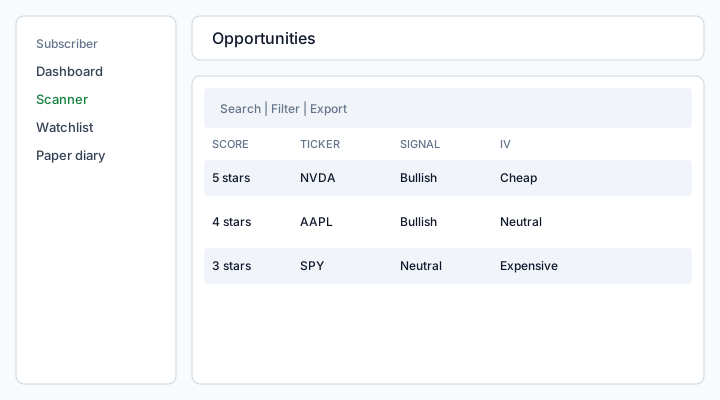
Figure: Opportunities results — search, Filter (IV regime and signal), Export, and expandable fichas.
What each column means
Score
Composite rank for this run (higher is more interesting for this scan, not a predicted return). The UI shows 1–5 stars derived from rankingScore. Missing score (older jobs) sorts last and shows no stars. Example: 5 stars means the engine placed this ticker at the top of this run’s list.
Ticker
Underlying symbol, uppercase (NVDA). Name is not a separate column here — use Watchlist or the platform catalog for display names.
Signal
Directional technical read for the underlying: Bullish, Bearish, or Neutral. It is a scan output, not a broker order.
IV regime
Whether option IV (Implied Volatility / volatilidad implícita) looks cheap, neutral, or expensive versus HV (Historical Volatility / volatilidad histórica) (or IV rank when the data source supplies it). Cheap IV often favors buying premium; expensive IV often favors selling premium — your thesis can differ.
Strategy
Template-style suggestion (for example a spread) that fits the signal + IV regime. Still research copy — you size and execute in the broker.
Data quality
How complete the chain/quotes were for this ticker. Poor quality is a reason to skip, not a hidden fill.
Expanded ficha
Expand a row (or ⋮) to see why the engine kept or discarded the setup, IV context, strategy, a broker checklist, and Save to diary. Discard reasons are explicit (“not a real opportunity”) so waiting can be the trade.
Backtest jobs show a stats strip (trades, win rate, average) above the trade log instead of opportunity columns.
Backtest trade log
A Backtest job is not a second ranking of the same tickers. The engine replays the long-only signal on historical stock prices (no lookahead).
- Each row is one simulated trade. AAPL three times means three separate entries/exits on AAPL.
- Green / red is that trade’s P&L percent, not a live position.
- Still open means the simulated position had not exited by the end of the window.
- Trades / win rate / avg pool every trade in the run. If you selected eight tickers, those stats mix eight independent simulations — they are not one portfolio.
- Strategy vs buy & hold appears only when the run has one ticker.
- Expand a row for entry and exit dates. This validates signal logic; it is not options P&L and not a broker order.
Directional scan is not the options ranking. Each ticker is a ficha: direction (bullish/bearish), why (moving averages), last price, and RSI. It is a technical read, not a broker order and not a strategy suggestion.
Screener looks for fundamentally “good and cheap” names. Zero hits on mega-caps or ETFs is a valid miss, not a broken job.
Bollinger channel
A Bollinger job is not the options ranking and not a backtest. The engine places each ticker in a 20-day, 2σ channel (same as bollinger.py).
- Each row is one ticker. Sorted by %B (lowest first = closer to the lower band).
- %B 0 = touching the lower band, 1 = upper band, 0.5 = the middle average.
- Squeeze means the channel is unusually tight vs the last half-year — a large move may follow, direction unknown.
- Bullish / bearish uses the CLI trend filter: a lower-band bounce counts only if price is above SMA50. Hugging the lower band in a downtrend is not a buy.
- Expand a row for band prices, bandwidth, and ATR%. Research only — not a broker order.
How to use
- From Scanner history, open a Completed Opportunities (or other) job.
- Sort by score; filter IV regime and signal if the list is long.
- Expand a row, read discard vs keep, then Save to diary or Analyze the ticker.
- Export is in the table toolbar and requires the Plan toggle
diaryExport/ results export entitlement.
If you scanned 8 tickers and only 5 fichas appear, the other 3 were analyzed. Direction and IV (Implied Volatility) did not align, so there is no ranked setup — waiting can be the trade. The results header lists those symbols.
Permissions
Same Subscriber session as the job. You cannot open another account’s jobId. Failed jobs show the error on the history row instead of this table.
See also: Scanner · Analyze a ticker · Paper diary.